Statuses & the plan list
Mark every object as Idea, Planned, In progress or Done, and keep track of it all in the plan list on the left, with search.
For App · browser and desktop · Updated
You'll give objects a status and use the plan list to see what's left to build. Free to plan alone · No account
The four statuses
| Status | Use it for |
|---|---|
| Idea | Something you might build |
| Planned | Decided. New objects start here. |
| In progress | You're building it |
| Done | Built |
On the map, ideas look faint and get more solid the further along they are. Name tags show the status, except for Planned.
Set a status
Select the object
Click it on the map or in the plan list.
Pick the status
In the inspector, open Status and pick one.
For many at once: select them (Shift + click), then Status (all).
The plan list
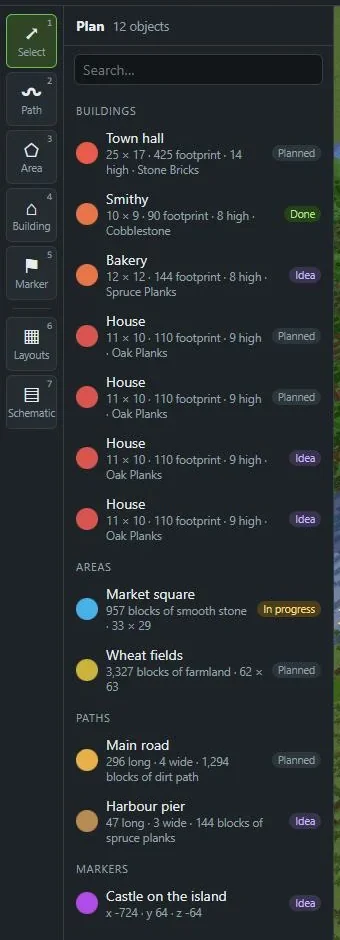
The list on the left shows everything in the dimension you're looking at:
- Groups first (from layouts), then Buildings, Areas, Paths and Markers
- For each object: its colour, name, a short line with size and block, and its status
- At the top: how many objects there are
Click a name and the map flies to it. Shift or Ctrl + click adds it to the selection instead.
Search
Type in Search… above the list. It finds names and notes, so a note like "needs 3 chests" is easy to find again.
Other dimensions
Plans in the Nether or the End have their own list. Switch with the dimension menu in the top bar: Overworld, Nether, The End.
In the game
With the Minecraft mod Included with Cloud, Team and Lifetime · Try 7 days free · Friends in your worlds use it free, you can set statuses while you build: Statuses & markers from in-game.