Bring your blocks
MC Planner shows your world with your own game's textures. Where your game's .jar file is for every launcher, and how to add resource packs and textures from mods.
For App · browser and desktop · Updated
Mojang's textures can't ship with apps, so MC Planner reads them from your own game, right here on your computer. Nothing is uploaded. You do this once: the browser (or the desktop app) remembers it.
Desktop app
The desktop app finds the game files by itself and lists them under "Found on this computer". Click a version and you're done.
Find the game file
The setup card shows these steps for the launcher you picked, with a Copy button for the folder.
Open the folder
- Windows: press Win+E, click the address bar, paste the folder, press Enter.
- macOS: in Finder press ⇧+⌘+G (Go to Folder), paste the folder, press Return.
- Linux: open your file manager, press Ctrl+L, paste the folder, press Enter.
Find your version
Official launcher: open the newest version folder (e.g. 26.2) and take 26.2.jar.
- Windows:
%APPDATA%\.minecraft\versions - macOS:
~/Library/Application Support/minecraft/versions - Linux:
~/.minecraft/versions
Modrinth App: open the newest version folder and take the .jar with the same name.
- Windows:
%APPDATA%\ModrinthApp\meta\versions - macOS:
~/Library/Application Support/ModrinthApp/meta/versions - Linux:
~/.local/share/ModrinthApp/meta/versions
CurseForge: open the newest version folder and take the .jar with the same name.
- Windows:
%USERPROFILE%\curseforge\minecraft\Install\versions - macOS:
~/Documents/curseforge/minecraft/Install/versions - Linux:
~/curseforge/minecraft/Install/versions
Prism Launcher: open the newest version folder and take minecraft-…-client.jar.
- Windows:
%APPDATA%\PrismLauncher\libraries\com\mojang\minecraft - macOS:
~/Library/Application Support/PrismLauncher/libraries/com/mojang/minecraft - Linux:
~/.local/share/PrismLauncher/libraries/com/mojang/minecraft
MultiMC keeps the same libraries/com/mojang/minecraft folders inside the folder MultiMC is in.
Don't see the version you play? Start it once in your launcher, then look again.
Drop it in
Drag the .jar onto the MC Planner window, or click Drop the game .jar here to choose it.
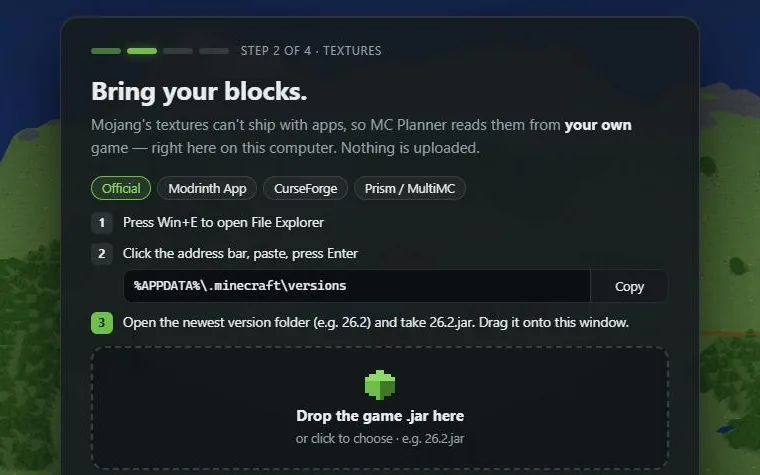
- 1: Drop the game .jar here
"Your blocks are here." shows how many blocks are ready, read from your file. Then MC Planner asks for your world: Open your world.
Resource packs and textures from mods
On the same card, open Resource packs / mod jars (optional):
- Add them before the game jar. They're layered on top: the first one wins.
- Resource packs (
.zip) change how blocks look, like in the game. - Mod jars add the textures of modded blocks. Without the mod's
.jar, its blocks show without their texture.
Dropped a mod or a pack by mistake instead of the game file? MC Planner keeps it for its textures and asks for the game jar itself.
Change them later
Textures are set while no world is open. Close the world (✕ at the top right), then press change next to the textures (✓ 26.2, for example) and drop the new files.
Friends without Minecraft on their computer
Invited to a shared world, but no Minecraft here? The invite card offers Get the block textures from Mojang. Your browser downloads the host's version of the game file straight from Mojang, once. By clicking you confirm you own Minecraft: Java Edition and accept the Minecraft EULA. MC Planner never stores or passes on Mojang's files.
Or press Join with map colours only: you see the host's map and can plan, without 3D blocks.
No Minecraft and no invite? The demo island needs no game files.